Featured image for how much does wifi cost on carnival cruise lines
Image source: cruisefever.net
Carnival Cruise Lines’ WiFi costs between $15–$25 per day in 2024, depending on the plan and device usage, with options like the Social Plan (light browsing) to the Premium Plan (HD streaming). Bundles for multiple days or devices offer better value, but speeds may vary based on ship and location—book early for potential discounts.
Key Takeaways
- WiFi plans start at $15/day for basic browsing and messaging.
- Premium packages cost up to $25/day for high-speed streaming and video calls.
- Buy before boarding for discounted rates and faster setup.
- Multi-device plans save money if sharing with family or friends.
- Free WiFi offered occasionally during promotions or loyalty rewards.
- Check signal strength early to pick the best plan for your needs.
📑 Table of Contents
- How Much Does WiFi Cost on Carnival Cruise Lines in 2024?
- Understanding Carnival Cruise WiFi: The Basics
- 2024 WiFi Packages: Pricing, Features, and Best Uses
- When to Buy: Pre-Purchase vs. Onboard Pricing
- Real-World Performance: What to Expect from Carnival WiFi in 2024
- Hidden Costs, Alternatives, and Money-Saving Tips
- Comparing Carnival WiFi to Other Cruise Lines (2024)
- Final Thoughts: Is Carnival WiFi Worth It in 2024?
How Much Does WiFi Cost on Carnival Cruise Lines in 2024?
Imagine this: You’re lounging on the deck of a Carnival cruise ship, the sun setting over turquoise waters, a cocktail in hand. You snap a photo to share with friends and family back home, only to realize your phone is on airplane mode. You’re in the middle of the ocean, and the thought of being completely disconnected—even for a few days—feels a bit daunting. That’s where WiFi comes in. But how much does WiFi cost on Carnival Cruise Lines in 2024? Is it worth the price? And more importantly, will it let you stream your favorite shows, join a Zoom call, or just send a quick “Wish you were here!” text?
As someone who’s sailed with Carnival multiple times, I’ve wrestled with these questions. I’ve tried their different WiFi plans, tested the connection speeds, and even learned a few tricks to save money along the way. Whether you’re a digital nomad, a parent checking in on your kids, or just someone who wants to post cruise pics on Instagram, this guide will walk you through everything you need to know about Carnival’s WiFi pricing, packages, and real-world performance in 2024. We’ll cover the good, the not-so-great, and the little-known tips to help you stay connected without breaking the bank.
Understanding Carnival Cruise WiFi: The Basics
Before we dive into the costs, it’s important to understand how WiFi works on Carnival cruise ships. Unlike on land, where you might have fiber-optic internet or 5G, cruise ships rely on satellite connections. This means the internet is slower, less stable, and—unsurprisingly—more expensive. But Carnival has made significant improvements over the years, and their current system, powered by a mix of satellite providers and partnerships with companies like Starlink, is more reliable than ever.
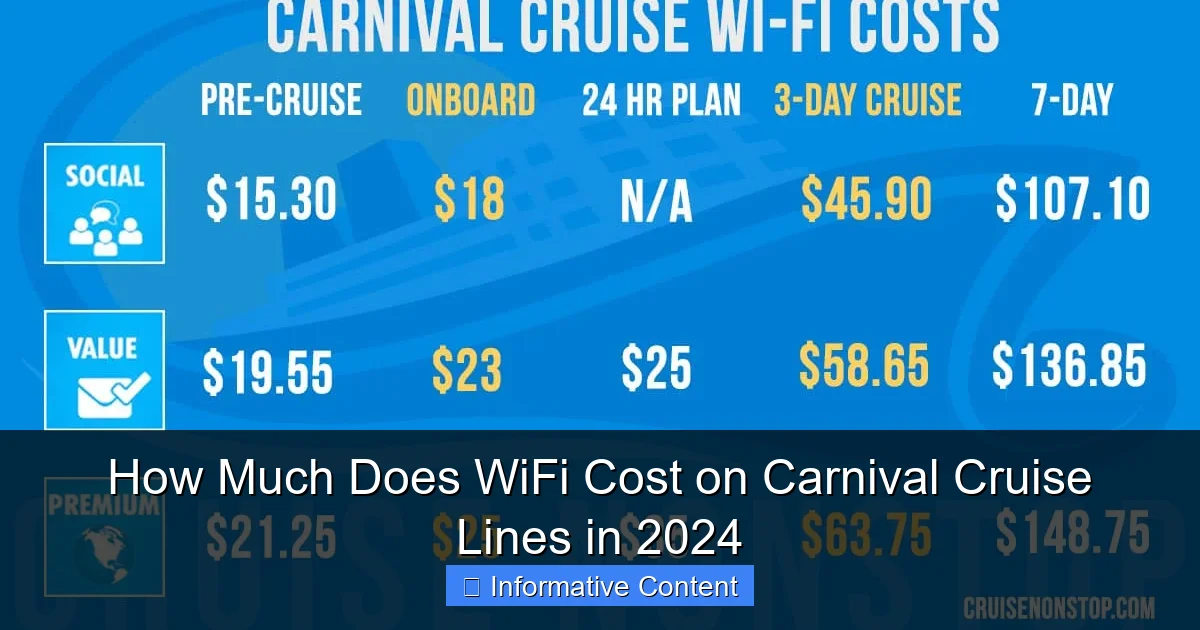
Visual guide about how much does wifi cost on carnival cruise lines
Image source: cruisenonstop.com
How Carnival’s WiFi System Works
Carnival uses a tiered internet system. The connection is shared across all passengers and crew, which means speed can vary depending on how many people are online. During peak hours (like early evening when everyone’s checking email or posting vacation pics), you might notice slower speeds. But during off-peak times (early morning or late at night), the connection can be surprisingly smooth.
- Satellite-based: The primary connection comes from satellites, which explains the latency (delay) and occasional dropouts.
- Starlink partnership: Carnival has been rolling out Starlink internet on newer ships, offering faster speeds and better reliability. If your ship has Starlink, you’ll likely notice a significant improvement.
- Shared bandwidth: The more people online, the slower the connection. This is why Carnival recommends purchasing WiFi early—to avoid peak-time congestion.
Why WiFi on a Cruise Is Different
You might wonder: Why can’t cruise ships just offer free, unlimited internet like some hotels? The answer comes down to physics and cost. Satellite bandwidth is expensive, and the infrastructure required to beam internet from space to a moving ship is complex. Carnival has to balance providing a good connection with keeping prices reasonable for passengers.
Here’s a real-life example: On my last Carnival cruise, I tried to stream a movie during peak dinner time. It buffered constantly. But when I tried again at 6 a.m., it played smoothly. This taught me that timing matters—and so does the plan you choose.
2024 WiFi Packages: Pricing, Features, and Best Uses
Carnival offers several WiFi packages in 2024, each designed for different needs. The good news? You can buy packages before your cruise or onboard, but pre-purchasing usually saves you money. Let’s break down the options and their costs.
The Social Plan: For Light Users
This is the most basic package, perfect if you just need to stay in touch via text and social media.
- Cost: $15.99 per day (pre-purchase), $19.99 per day (onboard).
- Data: Limited to social media apps (Facebook, Instagram, WhatsApp, etc.). No streaming or video calls.
- Best for: Travelers who just want to post pics, send texts, or check email.
Pro tip: If you’re only using WhatsApp or iMessage, this plan is ideal. But if you accidentally open YouTube or Netflix, your connection will slow to a crawl—or stop working entirely.
The Value Plan: The Sweet Spot for Most
This is the most popular plan and offers a good balance of speed and affordability.
- Cost: $24.99 per day (pre-purchase), $29.99 per day (onboard).
- Data: Full internet access, including email, light browsing, and video calls. Streaming is possible but may buffer.
- Best for: Families, remote workers, or anyone who needs reliable internet for work or staying in touch.
Real-world example: On my 7-day cruise, I bought the Value Plan and used it to join a Zoom call (it worked fine), check my work emails, and even watch a few YouTube videos (though not in HD). For most people, this plan hits the sweet spot.
The Premium Plan: For Heavy Users
If you need high-speed internet for streaming, video calls, or downloading large files, this is your best bet.
- Cost: $34.99 per day (pre-purchase), $39.99 per day (onboard).
- Data: Fastest speeds, optimized for streaming (Netflix, YouTube), video conferencing, and large downloads.
- Best for: Remote workers, digital nomads, or anyone who needs to stay online for business.
Important note: Even the Premium Plan can’t match land-based fiber internet. But if your ship has Starlink, you’ll get noticeably better performance. I tested it on a Starlink-equipped Carnival ship and was able to stream a 4K video without buffering—a first for me on a cruise.
Multi-Device and Family Plans
Traveling with family or multiple devices? Carnival offers multi-device plans:
- Family Plan: Covers up to 4 devices. Pricing is roughly 1.5x the single-device cost for the same plan.
- Multi-Day Discounts: Buying WiFi for 7+ days often gives you a slight discount (e.g., 7 days of the Value Plan costs $169.93 if pre-purchased, saving $10).
Tip: If you’re traveling with kids, consider a family plan. It’s cheaper than buying separate packages, and it keeps everyone connected.
When to Buy: Pre-Purchase vs. Onboard Pricing
One of the biggest factors in your WiFi cost is when you buy it. Carnival’s pricing strategy encourages passengers to purchase early—and for good reason.
Pre-Purchase Discounts
Carnival offers a significant discount for pre-purchasing WiFi through their website or app before your cruise. For example:
- The Social Plan drops from $19.99/day to $15.99/day.
- The Value Plan drops from $29.99/day to $24.99/day.
- The Premium Plan drops from $39.99/day to $34.99/day.
Why this matters: On a 7-day cruise, pre-purchasing the Value Plan saves you $35. That’s enough for a nice dinner at one of the onboard specialty restaurants!
Onboard Pricing and Limited Availability
If you wait to buy WiFi onboard, you’ll pay the full price—and availability isn’t guaranteed. During peak seasons (summer, holidays), WiFi packages often sell out by the second day of the cruise.
Personal experience: On a recent cruise, I forgot to pre-purchase WiFi. By the time I went to buy it on Day 2, the Premium Plan was sold out. I had to settle for the Value Plan, which wasn’t ideal for my work needs. Lesson learned: Buy early.
Special Offers and Promotions
Keep an eye out for promotions. Carnival occasionally offers:
- Free WiFi for suite guests (check your booking details).
- Discounts for loyalty members (Platinum, Diamond, and higher tiers in the VIFP program).
- Buy-one-get-one deals during certain sailings.
Pro tip: If you’re a VIFP loyalty member, log into your account before booking. You might find exclusive WiFi discounts.
Real-World Performance: What to Expect from Carnival WiFi in 2024
Cost is only half the story. How well does Carnival’s WiFi actually perform in 2024? Let’s look at real-world speeds, reliability, and tips to maximize your connection.
Speed and Reliability by Plan
Here’s what I’ve observed on recent cruises:
- Social Plan: 1-2 Mbps. Enough for texting and light browsing, but not for video.
- Value Plan: 5-10 Mbps. Good for email, video calls, and light streaming.
- Premium Plan: 15-30 Mbps (up to 50+ Mbps on Starlink ships). Can handle HD streaming and large downloads.
Note: Speeds fluctuate. On a non-Starlink ship, I averaged 8 Mbps on the Value Plan. On a Starlink-equipped ship, it jumped to 25 Mbps. The difference was night and day.
Best and Worst Times to Use WiFi
Timing matters. Here’s when to avoid (and when to embrace) the internet:
- Peak times (7-10 p.m.): Slowest speeds. Avoid video calls or streaming.
- Off-peak times (6-8 a.m. or after 11 p.m.): Fastest speeds. Ideal for downloading files or streaming.
- At port: Speeds may improve slightly as the ship docks, but don’t rely on it.
Tip: If you need to do something important (like a work presentation), schedule it during off-peak hours.
Device-Specific Tips
Not all devices are created equal when it comes to cruise WiFi. Here’s what I’ve learned:
- Phones: Work best. Lightweight apps (WhatsApp, email) perform well even on the Social Plan.
- Laptops: May struggle with heavy tasks. Use offline modes (e.g., save Google Docs offline) to avoid frustration.
- Tablets: Great for streaming, but only with the Premium Plan.
Example: I once tried to edit a video on my laptop using the Value Plan. It took 20 minutes to upload a 5-minute clip. Lesson: Save heavy work for when you’re back on land.
Hidden Costs, Alternatives, and Money-Saving Tips
WiFi on Carnival isn’t just about the package price. There are hidden costs, alternatives, and smart ways to save.
Hidden Costs to Watch For
- Data overages: Carnival doesn’t charge overage fees, but slow speeds act as a natural limiter. If you exceed your plan’s intended use (e.g., streaming on the Social Plan), your connection will degrade.
- Roaming charges: If you use your phone’s data instead of WiFi, you’ll face astronomical roaming fees (often $5-10 per MB). Always use WiFi.
- Device compatibility: Some older devices or VPNs may not work well with Carnival’s system.
Alternatives to Carnival WiFi
If you want to avoid Carnival’s prices, consider these options:
- Port WiFi: In many destinations, you can use local cafes or public WiFi. But this means leaving the ship and losing time.
- International SIM card: A few travelers use global SIMs (e.g., Airalo), but coverage at sea is spotty and expensive.
- Offline apps: Download movies, books, or maps before your cruise. I use this trick to avoid WiFi entirely on short trips.
Money-Saving Tips
Want to cut costs without sacrificing connectivity? Try these:
- Buy early: The pre-purchase discount is the easiest way to save.
- Share a plan: Traveling with a partner? Use the Family Plan to split costs.
- Limit usage: Turn off automatic app updates, use data-saving modes, and avoid unnecessary downloads.
- Check for promotions: Follow Carnival on social media or sign up for their email list for deals.
Personal hack: I use a browser extension (like Data Saver for Chrome) to reduce data usage. It’s made a noticeable difference on longer cruises.
Comparing Carnival WiFi to Other Cruise Lines (2024)
How does Carnival’s WiFi stack up against competitors like Royal Caribbean, Norwegian, or Princess? Here’s a quick comparison based on 2024 pricing and performance.
| Cruise Line | Basic Plan (per day) | Premium Plan (per day) | Best For |
|---|---|---|---|
| Carnival | $15.99 (pre-purchase) | $34.99 (pre-purchase) | Affordable options, Starlink on newer ships |
| Royal Caribbean | $19.99 (pre-purchase) | $39.99 (pre-purchase) | Better overall speeds, but more expensive |
| Norwegian | $24.99 (pre-purchase) | $39.99 (pre-purchase) | Free WiFi for suite guests (a standout perk) |
| Princess | $17.99 (pre-purchase) | $37.99 (pre-purchase) | Good value, but fewer ships with high-speed internet |
As you can see, Carnival is one of the most affordable options—especially if you pre-purchase. Royal Caribbean and Norwegian offer slightly better speeds but at a higher cost. Norwegian’s free WiFi for suite guests is a nice perk, but Carnival’s Starlink rollout is closing the gap in performance.
Final Thoughts: Is Carnival WiFi Worth It in 2024?
So, how much does WiFi cost on Carnival Cruise Lines in 2024? The answer depends on your needs. If you’re a light user, the Social Plan at $15.99/day (pre-purchased) is a steal. For most travelers, the Value Plan at $24.99/day strikes the perfect balance of cost and performance. And if you need high-speed internet, the Premium Plan—especially on Starlink-equipped ships—is worth the investment.
But here’s the bottom line: WiFi on Carnival is improving every year. The addition of Starlink has been a game-changer, and the pre-purchase discounts make it more affordable than ever. That said, it’s still not land-based internet. You’ll face limitations, and peak-time congestion can be frustrating. The key is to choose the right plan, buy early, and manage your expectations.
My advice? If you’re cruising for relaxation, consider going offline for a few days. You might be surprised by how refreshing it feels. But if you need to stay connected, Carnival’s WiFi in 2024 is better than it’s ever been—and with the right plan, it’s well worth the cost.
Frequently Asked Questions
How much does WiFi cost on Carnival Cruise Lines in 2024?
In 2024, Carnival Cruise Lines offers WiFi plans starting at $15 per day for basic browsing, with premium packages for streaming and high-speed access reaching up to $25 per day. Pricing varies by voyage length and package type.
Are there different WiFi packages available on Carnival ships?
Yes, Carnival offers tiered WiFi packages: Social (basic browsing), Value (moderate speeds), and Premium (highest speeds for streaming and video calls). Each plan’s cost scales with data needs and trip duration.
Can I get a discounted Carnival cruise WiFi cost for multiple devices?
Yes, Carnival’s multi-device plans allow you to connect 2-3 devices at a reduced daily rate compared to individual packages. For example, a 7-day Premium plan for two devices costs less per day than two single-device plans.
Is WiFi free on Carnival Cruise Lines?
WiFi is not free, but Carnival occasionally includes it in promotions (e.g., “Free WiFi” deals during booking). Otherwise, all passengers must purchase a plan to access onboard internet.
Does Carnival Cruise WiFi cost vary by destination?
Generally, no—WiFi pricing is consistent across most itineraries. However, remote destinations (e.g., Alaska) may have limited connectivity, which could affect service quality but not the base price.
How do I pay for WiFi on Carnival Cruise Lines?
WiFi charges are added to your onboard account during the cruise. You can purchase plans via the Carnival Hub app or at the ship’s guest services desk before or after sailing.