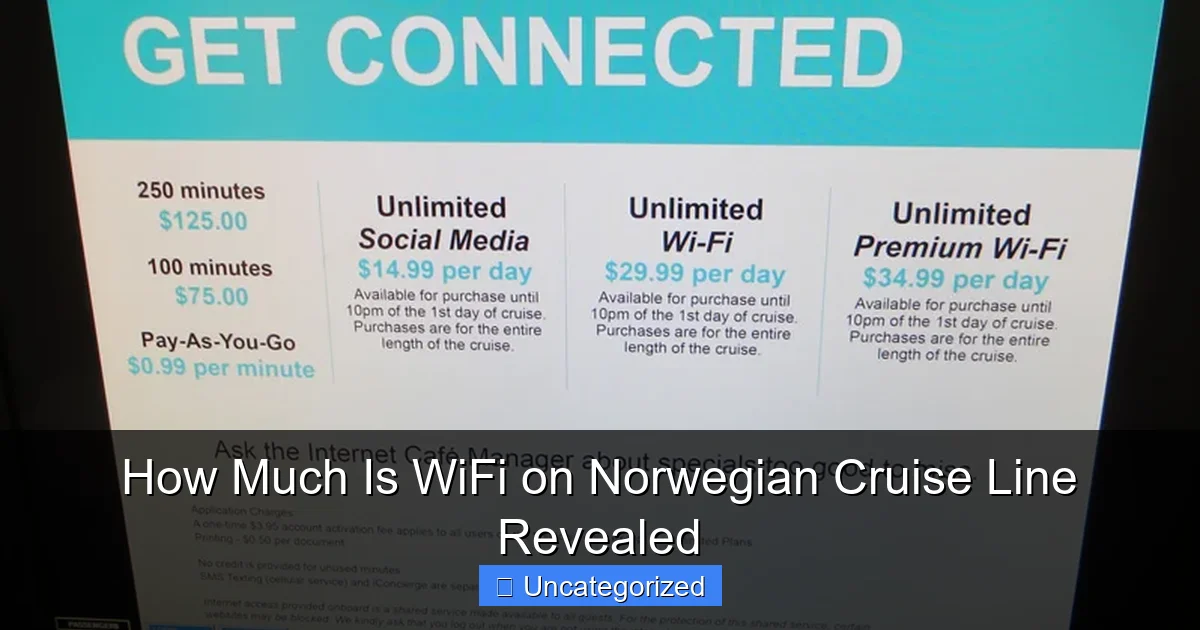
Featured image for how much is wifi on norwegian cruise line
Image source: oceanblissjourneys.com
Norwegian Cruise Line offers WiFi packages starting at $19.99 per day, with flexible options like pay-per-day, social media-only, and unlimited plans to suit every traveler’s needs. Prices vary by cruise length and demand, so booking early can lock in the best rates—plus, suites often include complimentary internet access. Stay connected without breaking the bank!
Key Takeaways
- WiFi packages start at $20/day for basic browsing and messaging.
- Premium plans cost $30+/day for streaming and faster speeds.
- Multi-device plans save money for families or groups traveling together.
- Book online pre-cruise to secure discounts up to 25% off.
- Free WiFi minutes included with select suite bookings and promotions.
- Signal strength varies by location—expect slower speeds in remote areas.
📑 Table of Contents
- The Ultimate Guide to WiFi Costs on Norwegian Cruise Line
- Understanding Norwegian Cruise Line’s WiFi Packages
- How Much Does WiFi Actually Cost? (2024 Pricing Breakdown)
- How WiFi Quality and Speed Vary Across NCL Ships
- Smart Ways to Save Money on NCL WiFi
- Tips for a Smooth WiFi Experience on NCL
- Conclusion: Making the Most of Your NCL WiFi Investment
The Ultimate Guide to WiFi Costs on Norwegian Cruise Line
Embarking on a Norwegian Cruise Line (NCL) vacation is an exciting adventure, but one question often lingers in the minds of travelers: how much is WiFi on Norwegian Cruise Line? In today’s hyper-connected world, staying online is no longer a luxury—it’s a necessity for sharing memories, working remotely, or simply keeping in touch with loved ones. Whether you’re planning a Caribbean getaway, an Alaskan expedition, or a European voyage, understanding the cost and quality of onboard internet is crucial to your cruise experience.
This comprehensive guide dives deep into the WiFi pricing, packages, and policies offered by Norwegian Cruise Line. From budget-friendly options to premium high-speed internet, we’ll break down everything you need to know to make an informed decision. We’ll explore the differences between packages, how to save money, and what to expect in terms of speed and reliability. By the end of this article, you’ll have all the tools to stay connected without breaking the bank—or your sanity.
Understanding Norwegian Cruise Line’s WiFi Packages
Norwegian Cruise Line offers a tiered WiFi system designed to accommodate different needs and budgets. Unlike some cruise lines that provide a one-size-fits-all internet plan, NCL has evolved its offerings to reflect modern connectivity demands. The packages are categorized based on speed, data usage, and number of devices, making it easier for cruisers to choose what suits them best.
Visual guide about how much is wifi on norwegian cruise line
Image source: oceanblissjourneys.com
Three Main WiFi Tiers: Social, Value, and Premium
NCL’s internet is divided into three primary tiers, each with distinct features and pricing. These are:
- Social WiFi: Ideal for casual users who want to stay active on social media platforms like Facebook, Instagram, and Twitter. This plan allows access to social networks, email, and messaging apps (e.g., WhatsApp, Facebook Messenger), but does not support video calls, streaming, or large file downloads.
- Value WiFi: A mid-tier option that includes everything in Social WiFi, plus the ability to stream videos, make video calls, and browse the web at higher speeds. It’s perfect for travelers who want to stay connected without splurging on the top-tier plan.
- Premium WiFi: The fastest and most comprehensive option. It supports high-definition video streaming (Netflix, YouTube), video conferencing (Zoom, Microsoft Teams), large file uploads/downloads, and multiple device usage. This is the go-to choice for remote workers, families, or those who want a seamless online experience.
Each package is available for a single device or multiple devices (typically up to 4), with pricing varying accordingly. For example, a single-device Premium plan will cost less than a 4-device Premium plan, but the per-device cost is more economical when shared among a group.
Duration-Based Pricing: Per Day vs. Full Cruise
WiFi packages can be purchased on a per-day basis or for the entire cruise duration. The full-cruise option is almost always more cost-effective. For instance, if a 7-day cruise has a daily rate of $25 for Premium WiFi, the total cost would be $175. However, NCL often offers full-cruise discounts, reducing the price to around $140–$160, saving you $15–$35.
Tip: Always calculate the total cost of daily plans versus the full-cruise option before booking. If you plan to use WiFi for more than 3–4 days, the full-cruise package is usually the better deal.
When Can You Purchase WiFi?
WiFi packages can be purchased in three ways:
- Pre-Cruise (Online): The most convenient and often cheapest option. Log into your NCL account and purchase WiFi before boarding. This ensures you’re connected from day one.
- Onboard (Kiosks & Guest Services): Available at self-service kiosks in the main atrium or at the Guest Services desk. Prices may be slightly higher than pre-cruise rates.
- Promotions & Last-Minute Deals: Keep an eye out for special offers during the cruise. NCL sometimes runs “Happy Hour” WiFi sales or discounts for booking early in the cruise.
Pro Tip: Book WiFi online at least 72 hours before departure to lock in the lowest rates and avoid last-minute price hikes.
How Much Does WiFi Actually Cost? (2024 Pricing Breakdown)
Now, let’s get to the heart of the question: how much is WiFi on Norwegian Cruise Line? Pricing varies based on ship, itinerary, and time of year, but we’ve compiled average 2024 rates to give you a clear picture. All prices are approximate and subject to change, but they reflect typical costs across popular NCL ships like the Norwegian Encore, Norwegian Bliss, and Norwegian Joy.
Standard Pricing by Package Type
Below is a breakdown of average daily and full-cruise (7-day) prices for each package:
| Package Type | Devices Covered | Daily Rate (Approx.) | 7-Day Full Cruise (Approx.) | Best For |
|---|---|---|---|---|
| Social WiFi | 1 | $10–$12 | $60–$75 | Light users, social media, email |
| Social WiFi | 4 | $25–$30 | $150–$180 | Families or groups sharing |
| Value WiFi | 1 | $18–$22 | $110–$130 | Streaming, video calls, moderate use |
| Value WiFi | 4 | $40–$50 | $240–$300 | Families, remote workers (light) |
| Premium WiFi | 1 | $25–$30 | $140–$175 | HD streaming, video conferencing, heavy use |
| Premium WiFi | 4 | $60–$75 | $350–$425 | Families, remote workers, large groups |
Factors That Influence Pricing
Several variables can affect the final cost of your WiFi package:
- Ship and Technology: Newer ships (e.g., Norwegian Prima, Norwegian Viva) use advanced satellite systems (like Starlink) for faster, more reliable connections. These ships may offer better speeds but could have slightly higher prices.
- Itinerary: Cruises in remote areas (e.g., Alaska, Arctic) may experience higher latency or limited bandwidth due to satellite coverage, which can affect performance and pricing strategies.
- Time of Year: Peak seasons (summer, holidays) often see higher demand, which can lead to temporary price increases or limited discounts.
- Promotions: NCL frequently runs special offers, such as “Buy One, Get One Free” on WiFi, or free Social WiFi with certain suite bookings.
Example: A family of four booking a 7-day Caribbean cruise on the Norwegian Escape might opt for the 4-device Premium WiFi package. At $390 for the full cruise, this works out to about $13.90 per person, per day—a reasonable cost for seamless connectivity.
Hidden Costs and Fine Print
Be aware of a few “gotchas” when budgeting for WiFi:
- Auto-Renewal: Daily plans automatically renew unless canceled. If you only want WiFi for 2 days, remember to disable it to avoid extra charges.
- Speed Throttling: During peak usage hours (evenings, port days), speeds may slow down. Premium users get priority, but even they can experience congestion.
- No Refunds: Once purchased, WiFi packages are non-refundable, even if you don’t use them.
How WiFi Quality and Speed Vary Across NCL Ships
Not all WiFi is created equal—and this is especially true on cruise ships. Norwegian Cruise Line has made significant investments in its internet infrastructure, but performance still depends on the ship, technology, and location.
Satellite vs. Shore-Based Connectivity
Most of NCL’s fleet uses satellite-based internet, which connects to orbiting satellites for data transmission. While this allows connectivity in the middle of the ocean, it comes with inherent limitations:
- Latency: Satellite signals travel long distances, causing a delay (typically 600–800ms). This can make video calls laggy and online gaming impossible.
- Bandwidth: Shared among all passengers. If 2,000 guests are online, speeds drop significantly.
- Weather Interference: Heavy rain or storms can disrupt signals.
However, newer NCL ships (e.g., Norwegian Prima, Norwegian Viva) are equipped with Starlink by SpaceX, a low-Earth-orbit satellite system. This technology reduces latency to under 100ms and increases bandwidth dramatically. Users report speeds of 100+ Mbps—comparable to home internet.
Real-World Speed Tests and User Experiences
Independent tests and passenger reviews show notable differences:
- Norwegian Prima (Starlink): Premium users report 80–120 Mbps download speeds. HD streaming, Zoom calls, and cloud backups work smoothly.
- Norwegian Encore (Traditional Satellite): Premium users average 15–25 Mbps. Video calls are usable but may stutter. Streaming works at 720p.
- Norwegian Jewel (Older Satellite): Speeds hover around 5–10 Mbps. Social and Value plans are acceptable, but Premium may feel overpriced.
Tip: Check NCL’s website or cruise forums to see if your ship has Starlink before booking. If it does, consider investing in Premium WiFi for the best experience.
Best Times to Use WiFi
To maximize speed and reliability:
- Early Morning (6–8 AM): Least crowded, fastest speeds.
- Port Days: When docked, ships often switch to shore-based internet, which is faster and more stable than satellite. Use this time for large uploads or downloads.
- Avoid Peak Hours: Evenings (7–10 PM) and sea days see the highest usage. If possible, schedule important calls or downloads for off-peak times.
Smart Ways to Save Money on NCL WiFi
WiFi is one of the biggest onboard expenses, but with smart planning, you can significantly reduce costs—or even get it for free.
Book Early: The Pre-Cruise Advantage
The single best way to save is to purchase WiFi before you board. NCL offers discounts of 10–25% for online purchases. For example, a 7-day Premium plan that costs $175 onboard might be $135 online. That’s $40 saved—enough for a specialty dinner!
How to do it: Log into your NCL account, go to “My Cruise,” and select “Add Internet.” Choose your package and complete the payment. You’ll receive a confirmation email with login instructions.
Take Advantage of Promotions and Perks
NCL runs frequent promotions:
- Free Social WiFi: Offered with certain suite bookings (e.g., The Haven) or loyalty program perks (Platinum and above).
- Buy One, Get One Free: Occasionally available for Value or Premium packages. Great for couples or solo travelers sharing a plan.
- Loyalty Discounts: Latitudes Rewards members (Gold, Platinum, Diamond) receive exclusive WiFi deals, including free upgrades.
Example: A Latitudes Platinum member booking a 10-day Mediterranean cruise might receive a free Social WiFi package or 50% off Premium.
Share Packages with Travel Companions
The 4-device packages offer significant savings per person. If you’re traveling with family or friends, split the cost:
- 4-device Premium: $400 for 7 days → $100 per person
- 1-device Premium: $160 each → $640 total (4 people)
That’s a $240 saving! Just ensure everyone understands the login process and usage limits.
Use Free Alternatives When Possible
Maximize free connectivity:
- Port Days: Use public WiFi at cafes, libraries, or shopping centers in ports of call. Most Caribbean and European destinations offer free hotspots.
- Onboard Lounges: Some ships have “WiFi zones” with free basic access (e.g., near the library or coffee shop).
- Messaging Apps: Use WhatsApp, iMessage, or Facebook Messenger over Social WiFi to stay in touch without upgrading.
Tips for a Smooth WiFi Experience on NCL
Even with the right package, a few hacks can enhance your connectivity and avoid frustration.
Optimize Your Device Settings
Before boarding, make these adjustments:
- Disable Auto-Updates: Turn off app and OS updates to avoid large downloads.
- Use Data-Saving Modes: Enable low-data modes on streaming apps (e.g., YouTube “Data Saver”).
- Download Content Offline: Save movies, music, and maps on Netflix, Spotify, and Google Maps before the cruise.
Manage Multiple Devices Efficiently
If using a multi-device plan:
- Assign devices to specific users to avoid login conflicts.
- Use a shared password manager (e.g., LastPass) to store WiFi credentials.
- Limit simultaneous heavy usage (e.g., don’t stream Netflix on two devices at once).
Troubleshooting Common Issues
Encounter slow speeds or login problems? Try these fixes:
- Restart Devices: Turn your phone/tablet off and on.
- Clear Browser Cache: Improves loading times.
- Contact Guest Services: If the issue persists, they can reset your account or provide a temporary boost.
Note: NCL’s WiFi portal requires re-login every 24–48 hours. Bookmark the login page for quick access.
Conclusion: Making the Most of Your NCL WiFi Investment
So, how much is WiFi on Norwegian Cruise Line? The answer depends on your needs, but with packages ranging from $60 (Social) to $425 (4-device Premium) for a 7-day cruise, there’s an option for every budget. The key is to plan ahead, compare packages, and leverage discounts to avoid overspending.
Remember: newer ships with Starlink offer superior speeds, making Premium WiFi a worthwhile investment. For budget-conscious travelers, Social or Value plans—combined with free port WiFi—can keep you connected without breaking the bank. And don’t forget to use the full-cruise option, share with companions, and take advantage of loyalty perks.
Ultimately, staying connected on a cruise should enhance your vacation, not detract from it. By understanding NCL’s WiFi offerings and following the tips in this guide, you’ll enjoy seamless connectivity, share your adventures in real time, and return home with memories—and photos—that last a lifetime. Happy sailing!
Frequently Asked Questions
How much is WiFi on Norwegian Cruise Line?
Norwegian Cruise Line (NCL) offers WiFi packages starting at around $24.99 per day for a basic plan, with premium options like high-speed and unlimited access costing up to $39.99 per day. Pricing varies based on cruise length and number of devices.
Does Norwegian Cruise Line offer free WiFi?
NCL does not include free WiFi in standard cruise fares, but select promotions or loyalty program tiers (like Latitudes Rewards) may offer complimentary internet minutes. Always check your booking details for included perks.
What are the best Norwegian Cruise Line WiFi packages?
The “Unlimited WiFi” plan (around $39.99/day) is ideal for heavy users, while the “Social Media” package ($24.99/day) suits light browsing. Couples can opt for a shared device plan to save costs.
Can I buy WiFi on Norwegian Cruise Line by the hour?
NCL primarily sells daily packages, but shorter “hourly” access (e.g., 30-minute trials) may be available onboard for quick tasks. For extended use, daily plans are more cost-effective.
Is the Norwegian Cruise Line WiFi price per device or per person?
WiFi pricing is typically per device—each phone, tablet, or laptop requires its own package. However, some plans allow multiple devices under one account at a higher cost.
Does Norwegian Cruise Line WiFi work in all areas of the ship?
WiFi coverage is strongest in public areas (decks, lounges) but may be spotty in cabins or remote locations. Premium plans often provide better connectivity and priority bandwidth.