
Featured image for how much is unlimited wifi on norwegian cruise line
Image source: oceanblissjourneys.com
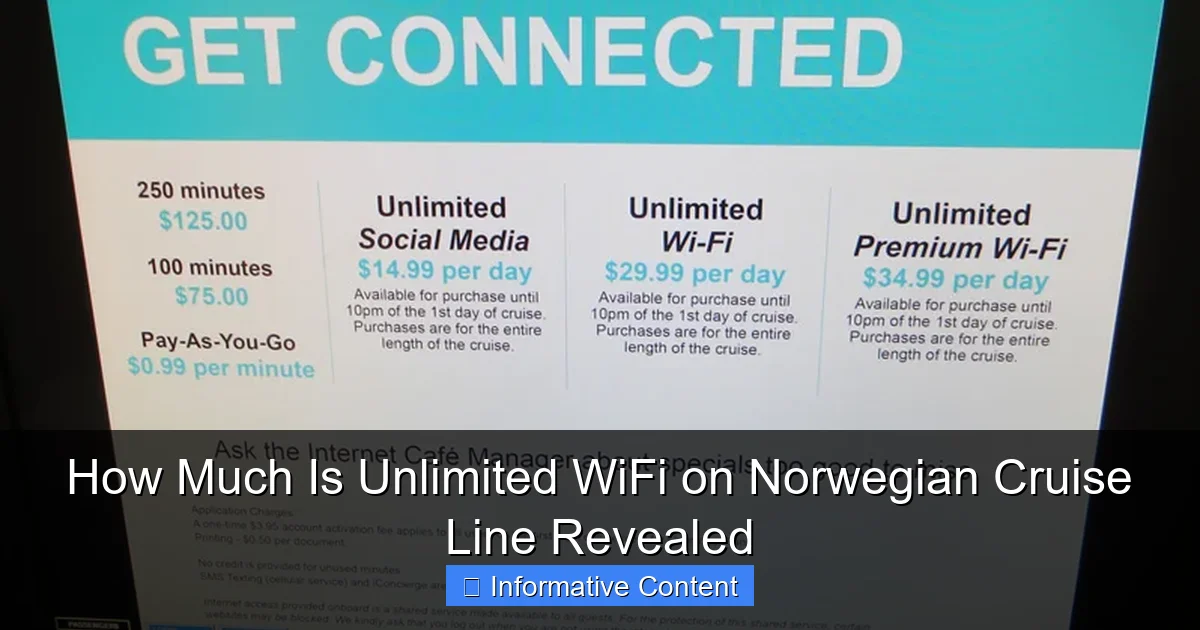
Norwegian Cruise Line’s unlimited WiFi starts at $24.99 per day, offering seamless browsing, streaming, and social media access across all devices. Multi-day and ship-wide plans are available, with discounts for early bookings and suite guests—making it easy to stay connected without surprise charges.
Key Takeaways
- Unlimited WiFi starts at $24.99/day for one device on Norwegian Cruise Line.
- Multi-device plans cost more—up to $39.99/day for two devices simultaneously.
- Book online pre-cruise for discounts—save up to 30% off onboard pricing.
- Free WiFi included with certain suites—check your stateroom category before purchasing.
- Social media-only plans available for budget travelers needing limited connectivity.
- Speed varies by location and demand—expect slower connections in remote areas.
📑 Table of Contents
- How Much Is Unlimited WiFi on Norwegian Cruise Line? A Complete Breakdown
- What Does “Unlimited WiFi” Actually Mean on NCL?
- How Much Is Unlimited WiFi on Norwegian Cruise Line? (2024 Pricing)
- Is NCL’s Unlimited WiFi Worth the Cost?
- How to Save Money on NCL WiFi (5 Proven Tips)
- Alternatives to NCL’s Unlimited WiFi
- Final Thoughts: Should You Buy Unlimited WiFi on NCL?
How Much Is Unlimited WiFi on Norwegian Cruise Line? A Complete Breakdown
Picture this: You’re standing on the deck of a stunning Norwegian Cruise Line (NCL) ship, the ocean breeze in your hair, a cocktail in hand, and the sun setting over turquoise waters. Your phone pings—your best friend just sent a message, your mom wants to know if you’re safe, and your boss is checking in (because, let’s be real, you’re not *completely* off the grid). Suddenly, you realize: how much is unlimited WiFi on Norwegian Cruise Line? And more importantly, is it worth it?
WiFi at sea used to be a luxury—slow, spotty, and outrageously expensive. But times have changed. Norwegian Cruise Line has stepped up its connectivity game, offering packages that cater to digital nomads, social media lovers, families sharing vacation snaps, and even those just trying to check email without breaking the bank. In this guide, I’ll walk you through everything you need to know about NCL’s unlimited WiFi options: pricing, performance, how to save money, and real-world tips from cruisers just like you. Whether you’re planning a 7-day Caribbean getaway or a 14-day Alaska adventure, this is the only WiFi guide you’ll need.
What Does “Unlimited WiFi” Actually Mean on NCL?
When Norwegian Cruise Line says “unlimited WiFi,” they mean *unlimited data*—but with a few important caveats. It’s not the same as your home internet. Think of it more like a high-speed mobile hotspot with fair usage policies. Let’s unpack what you’re really getting.
Visual guide about how much is unlimited wifi on norwegian cruise line
Image source: oceanblissjourneys.com
Speed Tiers: Not All “Unlimited” Is Created Equal
NCL offers three main WiFi packages, and while all are labeled “unlimited,” they differ in speed and device allowance:
- Social WiFi: Best for light use—checking social media, sending texts, browsing news. Speeds are slower, but it’s the cheapest option. Great for teens or casual users.
- Premium WiFi: The most popular choice. Supports video calls, streaming music, and HD video on one device. Ideal for couples or solo travelers.
- Premium Plus WiFi: The top-tier package. Allows streaming (Netflix, YouTube), video calls, and use on *two devices* simultaneously. Perfect for families or work-from-cruisers.
Important: Even “unlimited” doesn’t mean *unlimited bandwidth at top speed*. If you’re downloading 4K videos for hours, NCL may throttle speeds after a certain usage threshold (typically around 10–15 GB per day, depending on the ship and itinerary). But for normal use—social media, email, Zoom calls, occasional streaming—you won’t hit that limit.
Device Limits and Sharing
Here’s where things get tricky. The Premium WiFi package only works on *one device at a time*. Want to use your phone *and* laptop? You’ll need to log out of one to use the other. The Premium Plus package allows two devices to be logged in simultaneously—huge for families or couples who both want to stay connected.
Pro tip: If you’re traveling with a partner, consider buying one Premium Plus and sharing it. It’s often cheaper than two Premium packages. Just avoid using both devices at peak times (like during a Zoom call and Netflix streaming) to prevent slowdowns.
Coverage Areas: Where Can You Actually Use It?
NCL’s WiFi works across most public areas: decks, lounges, dining rooms, and even some outdoor spaces. But don’t expect strong signal in your stateroom—especially if it’s interior or deep in the ship. For best results, head to the atrium, pool deck, or any open-air space near the ship’s communication antennas (usually mid-ship).
One cruiser shared: “We used our Premium WiFi mostly on the pool deck. In our cabin, it was spotty unless we stood by the window. But the library had a great connection!”
How Much Is Unlimited WiFi on Norwegian Cruise Line? (2024 Pricing)
Now, the big question: how much is unlimited WiFi on Norwegian Cruise Line? Prices vary based on cruise length, destination, and when you buy. But here’s the current breakdown (as of 2024).
Per-Day vs. Cruise-Long Pricing
You can buy WiFi in two ways:
- Per-day add-ons: Pay daily (e.g., $25/day for Premium). Only worth it if you need WiFi for 1–2 days.
- Cruise-long packages: Buy at booking or onboard for the entire trip. This is *always* cheaper per day.
For a 7-day cruise, here’s what you’d typically pay:
- Social WiFi: $129–$159 total (~$18–$23/day)
- Premium WiFi: $199–$249 total (~$28–$36/day)
- Premium Plus WiFi: $299–$349 total (~$43–$50/day)
Prices rise for longer cruises. A 14-day Alaska voyage, for example, might charge $349 for Premium Plus (~$25/day). But the *per-day cost* usually drops the longer you sail.
Early-Bird Discounts: Save Up to 25%
NCL often offers WiFi discounts when you book early—sometimes up to 25% off. For example, a Premium package might be $249 at booking but $299 if added onboard. Check the “My Cruise” portal after booking for promo codes like “WIFI20” or “CONNECT15.”
One family of four booked a 10-day Caribbean cruise and saved $120 by adding Premium Plus WiFi during the initial booking. “We almost waited until the ship,” they said, “but the discount was too good to pass up.”
Group and Family Discounts
Traveling with a group? NCL sometimes offers multi-package bundles. For example, buy three Premium WiFi packages and get the fourth 50% off. These deals are rare but worth watching for—especially on longer sailings.
Note: These aren’t advertised widely. Ask your travel agent or call NCL customer service to check availability.
Data Table: 2024 WiFi Pricing by Cruise Length
| Cruise Length | Social WiFi | Premium WiFi | Premium Plus WiFi |
|---|---|---|---|
| 3–4 Days | $79–$99 | $129–$149 | $199–$229 |
| 7 Days | $129–$159 | $199–$249 | $299–$349 |
| 10–11 Days | $189–$219 | $279–$329 | $399–$449 |
| 14 Days | $249–$289 | $349–$399 | $499–$549 |
Note: Prices are approximate and vary by ship, itinerary, and booking time. Always check the NCL website or your cruise planner for exact quotes.
Is NCL’s Unlimited WiFi Worth the Cost?
Let’s be real: $300 for WiFi on a 7-day cruise sounds steep. But is it worth it? That depends on *how* you plan to use it.
Who Should Buy Unlimited WiFi?
- Remote workers: If you’re checking emails, joining Zoom calls, or handling work tasks, Premium or Premium Plus is a must. The stability is better than you’d expect—just avoid peak hours (11 AM–3 PM).
- Families with teens: Teens *will* want to post on TikTok or text friends. A Premium Plus package lets you both stay connected without fighting over devices.
- Social sharers: Love posting vacation pics? Premium Plus supports high-res uploads. One cruiser said: “I posted 50 photos to Instagram and didn’t notice any slowdown.”
- Cruisers with medical needs: Need to stay in touch with doctors? A reliable connection is worth every penny.
Who Can Skip It (or Go Cheaper)?
- Digital detoxers: If you’re on vacation to unplug, skip WiFi entirely. NCL’s app works offline for schedules, menus, and deck plans.
- Light users: Only checking email or WhatsApp? Social WiFi ($18/day) might suffice. Just don’t try streaming.
- Cruisers in port: Many destinations (like Nassau, Cozumel, or Juneau) have free WiFi at cafes, malls, or tourist spots. Save your NCL package for sea days.
Real-World Performance: What Cruisers Say
We scoured cruise forums and reviews to find honest feedback:
- The Good: “Premium Plus handled my daily Zoom meetings perfectly. I even streamed a movie on the balcony!” (Alaska cruise, 2023)
- The Bad: “Social WiFi was too slow for anything but texting. We upgraded to Premium onboard—worth it.” (Caribbean cruise, 2024)
- The Ugly: “WiFi dropped during a storm near Hawaii. But it came back after an hour.” (Pacific cruise, 2023)
Bottom line: NCL’s WiFi is *reliable enough* for most uses, but it’s not flawless. Weather, ship location, and network congestion can cause hiccups.
How to Save Money on NCL WiFi (5 Proven Tips)
Want unlimited WiFi without the sticker shock? Here’s how to save—without sacrificing connectivity.
1. Book Early (and Watch for Promos)
The biggest savings come from early booking. NCL often runs “Buy One, Get One 50% Off” or “20% Off WiFi” promotions for bookings made 6+ months in advance. Set up a Google Alert for “Norwegian Cruise WiFi discount” or check deal sites like CruiseCritic.
Example: A 7-day cruise in 2024 had a “WIFI25” code for 25% off all packages. That turned a $249 Premium into $187—a $62 savings!
2. Use the “My Cruise” Portal
After booking, log into your “My Cruise” account. NCL frequently adds limited-time WiFi deals there—sometimes *cheaper* than what’s advertised on their main site. One cruiser found a “Premium Plus for $279” deal (normally $349) just by checking the portal 3 months before sailing.
3. Split a Premium Plus Package
If you’re traveling with a partner, buy one Premium Plus and share it. You’ll both get two-device access at a lower cost than two Premium packages. Just coordinate usage—don’t both start streaming at once!
Pro tip: Use a shared Google Sheet to track who’s logged in and when.
4. Upgrade Onboard (Sometimes)
If you buy a cheaper package (like Social) and later want more, you *can* upgrade onboard—but it’s usually at the full price (no discounts). Still, if you realize you need it, it’s better than paying per day.
One couple upgraded from Social to Premium Plus on day 3 and said: “We should’ve done it earlier. The difference in speed was night and day.”
5. Use Free WiFi in Port
Skip using your NCL package while docked. Instead, use free WiFi at:
- Starbucks, McDonald’s, or local cafes
- Port welcome centers (common in Caribbean and Alaska)
- Shopping malls (like Atlantis in Nassau)
Just be cautious: Avoid sensitive logins (banking, email) on public networks. Use a VPN if needed.
Alternatives to NCL’s Unlimited WiFi
What if you don’t want to pay for WiFi at all? Or need more flexibility? Here are your options.
Free WiFi (Yes, It Exists)
NCL offers *limited* free WiFi for:
- Checking the NCL app (schedules, dining reservations, deck maps)
- Receiving emergency announcements
- Accessing the ship’s website (for onboard activities)
But you can’t browse the web, send emails, or use social media. Think of it as “basic connectivity,” not internet.
Port WiFi: Your Best Free Option
Most ports have free (or cheap) WiFi. For example:
- Nassau, Bahamas: Free at the cruise terminal and downtown
- Juneau, Alaska: Free at the library and visitor center
- Cozumel, Mexico: Free at Starbucks and many cafes
Download offline maps (Google Maps, Maps.me) and save web pages (like restaurant reviews) before you go.
Personal Hotspots: The DIY Approach
Some cruisers bring a portable hotspot (like Skyroam or Solis). These use global SIM cards and cost ~$9–$12/day for unlimited data. But: they only work in port, not at sea. And coverage varies by country.
One traveler said: “I used my Skyroam in Mexico and saved $200 on WiFi. But it didn’t work on the ship at all.”
Roaming: The Expensive Backup
Your home phone plan might offer international roaming (e.g., Verizon Travel Pass, T-Mobile Magenta). But data is usually capped (5–10 GB) and costs $10–$15/day. Not ideal for heavy use.
Final Thoughts: Should You Buy Unlimited WiFi on NCL?
So, how much is unlimited WiFi on Norwegian Cruise Line? For a 7-day cruise, expect to pay $130–$350 depending on the package. But the real question is: *is it worth it for you?*
If you’re a digital minimalist, love unplugging, or only need to check email once a day, you can probably skip it. Use port WiFi or the free NCL app to stay informed. But if you’re working remotely, sharing vacation moments, or traveling with teens who *need* to post, the cost is justified.
Here’s my advice: Buy early, choose the right tier, and use smart strategies to save. A Premium Plus package booked 6 months in advance with a 20% discount is a far better deal than paying full price onboard. And if you’re unsure? Start with Social WiFi and upgrade later if needed—just don’t wait until the last minute.
At the end of the day, cruise WiFi isn’t perfect. It can be slow, drop unexpectedly, or feel overpriced. But for most travelers, the ability to stay connected—to family, work, or the world—is worth the trade-offs. After all, isn’t the best vacation one where you can enjoy the view *and* text your best friend: “You have to see this sunset!”
So pack your devices, grab your login details, and set sail. With the right WiFi plan, you’ll never have to choose between the open sea and your open inbox.
Frequently Asked Questions
How much is unlimited WiFi on Norwegian Cruise Line?
The cost of unlimited WiFi on Norwegian Cruise Line varies by sailing length but typically ranges from $25 to $35 per day, per device. Discounts are often available when booking multi-day packages before departure.
Is there a free unlimited WiFi option on Norwegian Cruise Line?
Norwegian Cruise Line does not offer free unlimited WiFi, but select promotions may include complimentary internet packages. Standard pricing applies for unlimited access, with deals often available during early booking.
Can I share an unlimited WiFi package with multiple devices on Norwegian?
Yes, Norwegian Cruise Line allows WiFi packages to be shared across multiple devices, though performance may vary. Each additional device may require a separate purchase or a higher-tier plan for optimal speeds.
Does Norwegian Cruise Line offer unlimited WiFi discounts for early bookings?
Yes, booking your unlimited WiFi package online before your cruise often secures discounts of up to 30% compared to onboard rates. Check Norwegian’s website for current “how much is unlimited WiFi on Norwegian Cruise Line” deals.
What’s the difference between basic and premium unlimited WiFi on Norwegian?
Basic unlimited WiFi suits browsing and social media, while premium offers faster speeds for streaming and video calls. Premium plans cost $5–$10 more per day and are ideal for heavy users.
Can I use unlimited WiFi on Norwegian Cruise Line to work remotely?
Yes, but opt for the premium unlimited WiFi package for reliable speeds during video conferences and large file uploads. Coverage and performance may vary depending on the ship and itinerary.
