
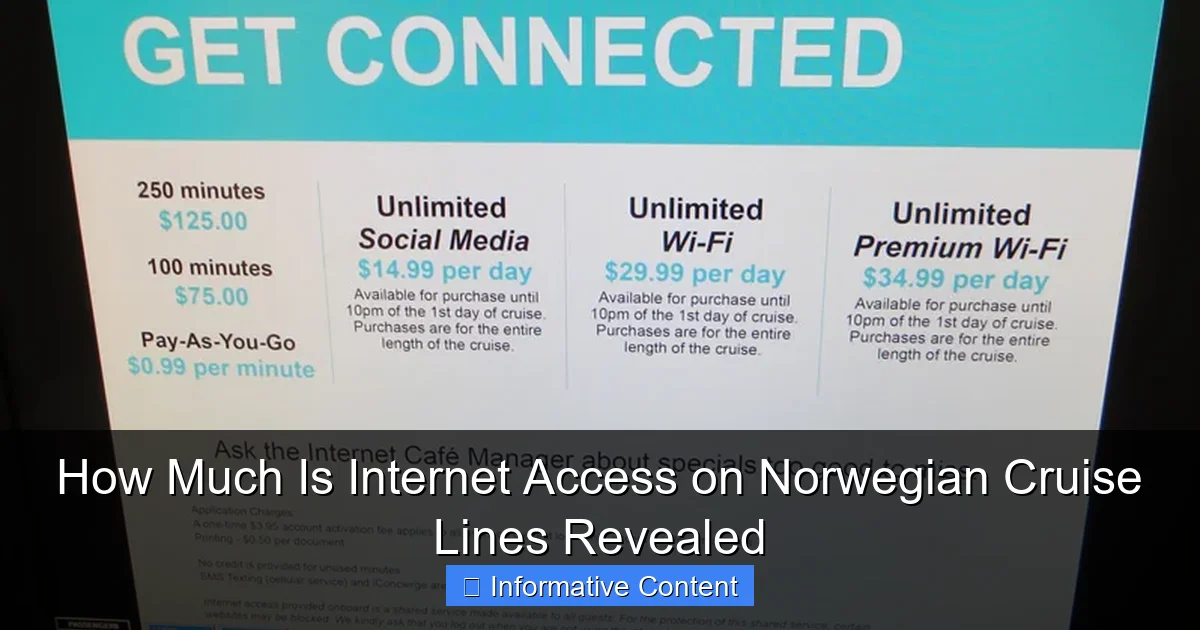
Featured image for how much is internet access on norwegian cruise lines
Image source: cruzely.com
Norwegian Cruise Lines offers internet access starting at $24.99 per day, with flexible packages tailored to different needs, including social media-only and full high-speed options. Prices vary by cruise length and device usage, making it easy to choose a plan that fits your online habits while at sea.
Key Takeaways
- Wi-Fi packages start at $25/day for basic browsing and social media access.
- Premium plans offer faster speeds for streaming and video calls at higher prices.
- Multi-device plans available—ideal for families or groups sharing internet access.
- Book online pre-cruise for discounts—save up to 20% off onboard rates.
- Free Wi-Fi not included except for top-tier suite guests and loyalty members.
- Usage is tracked by time or data—choose the plan that fits your needs.
📑 Table of Contents
- How Much Is Internet Access on Norwegian Cruise Lines? A Complete Breakdown
- Understanding Norwegian Cruise Line’s Internet Plans
- How Much Is Internet Access on Norwegian Cruise Lines? Pricing by Cruise Length
- Speed, Reliability, and Network Performance
- How to Buy Internet: Pre-Cruise vs. Onboard
- Smart Hacks and Money-Saving Tips
- Data Table: NCL Internet Plan Comparison
- Final Thoughts: Is NCL Internet Worth It?
How Much Is Internet Access on Norwegian Cruise Lines? A Complete Breakdown
Let’s be honest—no one *really* wants to disconnect completely when they’re on vacation. Sure, the idea of unplugging with a cocktail in hand, watching the sunset over the Caribbean, sounds dreamy. But in reality? We all check our phones. Maybe it’s to share a photo with family, reply to a work email (just one!), or find out if that package finally shipped. If you’re sailing with Norwegian Cruise Lines (NCL), you’ve probably asked yourself: *How much is internet access on Norwegian Cruise Lines?*
The answer isn’t as simple as a flat rate. NCL offers several internet plans, and the cost depends on when you book, how long your cruise is, and how many devices you need to connect. As someone who once tried to work remotely from a balcony in Cozumel (spoiler: it didn’t go well), I’ve learned that understanding your internet options *before* boarding can save you from surprise charges and frustratingly slow speeds. In this guide, I’ll walk you through everything you need to know—pricing, plans, speed, tips, and even a few hacks to make your cruise internet experience as smooth as the open sea.
Understanding Norwegian Cruise Line’s Internet Plans
Norwegian Cruise Lines calls its internet service “Free at Sea Internet”—a name that might make you think it’s free. Spoiler: it’s not. But the branding reflects a shift in recent years. NCL now includes *some* internet in many of their cruise packages, especially if you book certain promotions. Still, most guests end up paying extra for reliable, multi-device access.
Visual guide about how much is internet access on norwegian cruise lines
Image source: voyagerinfo.com
What’s Included in “Free at Sea” Internet?
If you’ve booked a cruise during a “Free at Sea” promotion, you might get one free internet package per stateroom. This is typically the Basic Internet plan, which allows you to browse, send emails, and use social media—but not stream video or make video calls. It’s perfect if you just want to stay in touch with family or post a few vacation pics.
For example, on a 7-night Caribbean cruise, the Basic plan might be included, but if you want to FaceTime your kids or stream a movie, you’ll need to upgrade. The catch? Only one device is usually covered under the free plan. Want your phone, tablet, *and* laptop connected? That’ll cost extra.
Three Main Internet Plans: Basic, Social, and Premium
NCL offers three core internet packages:
- Basic Internet: Browsing, email, and light social media. No video streaming. Best for checking messages or using maps. Cost: ~$24.99–$34.99 for a 7-night cruise.
- Social Internet: Includes Basic features + access to major social platforms (Facebook, Instagram, Twitter, WhatsApp, etc.). Still no video streaming. Cost: ~$34.99–$44.99 for 7 nights.
- Premium Internet: Full-speed access. Stream videos, make video calls, use Zoom, download files. Supports multiple devices. Cost: ~$49.99–$69.99 for 7 nights.
Prices vary slightly by ship, destination, and cruise length. Longer cruises (10+ nights) usually have a lower per-night rate, while shorter trips (3–4 nights) can be more expensive per day.
Multi-Device Add-Ons and Family Plans
Here’s where things get tricky. The free or purchased plan usually covers **one device**. Want to connect your spouse’s phone, your teen’s tablet, and your laptop? You’ll need to buy additional device passes—typically $15–$20 per device for the same plan. Some guests report that buying a second Premium plan for the whole stateroom is cheaper than adding two single-device passes.
Pro tip: If you’re traveling with family or friends, coordinate your plan. One person buys Premium for the stateroom, and everyone uses that login. Just make sure you’re all on the same network (more on that below).
How Much Is Internet Access on Norwegian Cruise Lines? Pricing by Cruise Length
Now let’s get into the nitty-gritty: actual costs. The price of internet on NCL depends heavily on how long you’re sailing. The longer the cruise, the lower the daily rate—but the total cost still adds up.
Short Cruises (3–4 Nights)
For a quick weekend getaway to the Bahamas, expect to pay:
- Basic: $19.99–$24.99 total
- Social: $29.99–$34.99 total
- Premium: $39.99–$49.99 total
Per night, that’s $10–$15 for Premium. Not terrible for a short trip, but if you’re only using it for a few hours, it might feel steep.
Standard Cruises (7 Nights)
The most common cruise length. Here’s what you’ll pay:
- Basic: $24.99–$34.99 ($3.57–$5 per night)
- Social: $34.99–$44.99 ($5–$6.43 per night)
- Premium: $49.99–$69.99 ($7.14–$10 per night)
Many 7-night cruises include the Basic plan for free during promotions. But if you want to stream a movie on your balcony or join a virtual meeting, Premium is your best bet.
Longer Cruises (10–14 Nights)
For extended voyages (e.g., transatlantic, repositioning, or world cruises), NCL offers better value:
- Basic: $39.99–$54.99 ($3.33–$5.50 per night)
- Social: $54.99–$69.99 ($4.58–$7 per night)
- Premium: $79.99–$109.99 ($6.67–$7.86 per night)
Notice how the per-night cost drops. A 14-night cruise with Premium internet averages $7.21 per night—less than a fancy coffee. That’s a solid deal if you need consistent connectivity.
Real-World Example: A Family of 4 on a 7-Night Cruise
Imagine you’re traveling with your spouse and two teens. You want everyone to have reliable internet. Here’s your cost breakdown:
- 1 Premium plan (covers one device): $59.99
- 3 additional device passes: 3 × $19.99 = $59.97
- Total: $119.96
Ouch. But here’s a smarter option: Buy **two Premium plans** (each covers one device, but NCL sometimes allows sharing within a stateroom). Total: $119.98—same price, but you avoid the hassle of managing device passes. Some guests report that NCL’s system lets them log in on multiple devices with one plan, especially if they’re all used in the same room. It’s not guaranteed, but worth trying.
Speed, Reliability, and Network Performance
Price is only half the story. How well does NCL’s internet actually work? The short answer: it varies—by ship, location, time of day, and even weather.
Satellite vs. Shore-Based Internet
NCL uses a mix of satellite and shore-based connections. When the ship is near land (e.g., in ports or coastal waters), it connects to local networks via 4G/5G—this is when speeds are fastest. But when you’re in the middle of the ocean, the ship relies on satellite, which is slower and less reliable.
On a recent cruise, I noticed my Premium plan worked great in Nassau (shore-based), but once we sailed into open water, speeds dropped by about 70%. Video calls froze, and streaming was choppy unless I used a VPN or downloaded content in advance.
Speed Expectations by Plan
- Basic: 1–2 Mbps. Enough for emails and light browsing. Don’t expect to load Instagram stories quickly.
- Social: 2–4 Mbps. Handles Facebook, Instagram, and WhatsApp calls. Still no streaming.
- Premium: 5–10 Mbps. Can stream HD video *if* the satellite signal is strong. Video calls work, but may lag during peak usage times.
Peak times (evenings, after dinner, or during port days) see the most congestion. I learned the hard way that trying to join a Zoom call at 7 PM onboard is a gamble. Best to schedule important calls during off-peak hours (early morning or late night).
Tips to Maximize Speed and Reliability
- Download before you go: Save maps, music, movies, and work files before boarding. Use Wi-Fi at the hotel or airport.
- Use a VPN: A good VPN (like NordVPN or ExpressVPN) can stabilize connections and reduce buffering.
- Log in early: Activate your plan as soon as you board. Sometimes the first 24 hours have better speeds.
- Avoid the atrium: The main lobby and pool deck are Wi-Fi hotspots—but also the most crowded. Try quieter areas like the library or your balcony.
- Restart your device: If the connection drops, turn Wi-Fi off and on again. Sometimes the system just needs a refresh.
How to Buy Internet: Pre-Cruise vs. Onboard
When you buy your internet plan can make a big difference—not just in price, but in flexibility.
Pre-Cruise Purchases (Recommended)
You can buy internet packages online through the NCL app or website **up to 24 hours before boarding**. This is the smartest move for a few reasons:
- Discounts: NCL often offers 10–20% off if you buy early. For example, a $60 Premium plan might drop to $48.
- Guaranteed access: No risk of plans selling out (yes, it happens during peak seasons).
- No lines: Skip the onboard internet desk and activate your plan the moment you board.
I once waited until I was on the ship to buy internet. The line at the guest services desk took 45 minutes, and by the time I got connected, I’d missed a work deadline. Lesson learned.
Onboard Purchases (Last Resort)
You can buy or upgrade your plan at the Internet Café (usually near the atrium) or through the NCL app once onboard. But:
- Prices are often higher (no early-bird discounts).
- Plans may be sold out, especially on full ships.
- You’ll need to wait for activation (could take 1–2 hours).
If you *must* buy onboard, do it early in the cruise. The desk opens at 8 AM, and lines form fast. Also, check the NCL app—sometimes it offers flash sales or last-minute upgrades at a discount.
Using the NCL App to Manage Your Plan
The NCL app is your best friend for internet management. Once you buy a plan, you can:
- Activate or deactivate it
- See data usage and speed
- Buy additional device passes
- Switch plans (e.g., upgrade from Social to Premium)
Download the app before your cruise and log in with your reservation details. It’s free and works offline for schedules, maps, and dining menus.
Smart Hacks and Money-Saving Tips
Let’s face it—cruise internet is expensive. But with a few clever tricks, you can stay connected without blowing your vacation budget.
Use Free Wi-Fi in Ports
When the ship docks, you’re usually within range of shore-based Wi-Fi. Many ports (like Nassau, St. Thomas, and Cabo) have free networks at cafes, malls, or tourist centers. I once spent an hour at a beachside café with free Wi-Fi, downloaded my work files, and sent emails—all without using a single minute of my onboard plan.
Pro tip: Download a Wi-Fi finder app (like Wi-Fi Map) before your trip. It shows free networks in real time.
Share Plans with Travel Companions
If you’re traveling with a group, share a single Premium plan. NCL’s system sometimes allows multiple devices to connect under one login, especially if they’re used in the same stateroom. I’ve done this with my family—we all logged in from our phones and tablets using one account. Just don’t try to stream 4K video on all devices at once!
Use Offline-First Apps
Download apps that work offline:
- Maps: Google Maps (download offline maps)
- Music: Spotify or Apple Music (download playlists)
- Books: Kindle or Audible (download before the cruise)
- Work tools: Google Docs (work offline, sync later)
This way, you only need internet for essential tasks like email or video calls.
Consider a Local SIM Card (For Tech-Savvy Travelers)
If your cruise stops in multiple countries, a local SIM card can be cheaper than onboard internet. For example, in Mexico, you can buy a 10 GB SIM for $20—less than a 3-day Premium plan. Just make sure your phone is unlocked and supports the local network.
Warning: This only works if you’re in port long enough to set it up. Not ideal for short stops.
When to Skip Internet Altogether
Sometimes, the best internet plan is *no plan*. If you’re on a short cruise or just want to truly disconnect, enjoy the peace. Use the ship’s library, read a book, or play board games. You might be surprised how good it feels to be offline.
Data Table: NCL Internet Plan Comparison
| Plan | Best For | Speed | 7-Night Cost | Video Streaming | Video Calls |
|---|---|---|---|---|---|
| Basic | Email, maps, light browsing | 1–2 Mbps | $24.99–$34.99 | ❌ No | ❌ No |
| Social | Social media, messaging, light apps | 2–4 Mbps | $34.99–$44.99 | ❌ No | ✅ Yes (text/audio) |
| Premium | Streaming, video calls, remote work | 5–10 Mbps | $49.99–$69.99 | ✅ Yes (HD) | ✅ Yes |
Note: Prices vary by ship, season, and promotions. Additional device passes cost $15–$20 each.
Final Thoughts: Is NCL Internet Worth It?
So, how much is internet access on Norwegian Cruise Lines? For most 7-night cruises, you’re looking at $25–$70 for a single-device plan, with extra costs for additional devices. Is it worth it? That depends on your needs.
If you’re a digital nomad, remote worker, or parent checking in on kids, the Premium plan is a must. Yes, it’s expensive, but the peace of mind is priceless. For casual users who just want to post a few photos or check email, the Basic or Social plan (especially if free with a promotion) is enough.
Remember: buy early, plan smart, and use offline tools. Don’t let internet stress ruin your vacation. And if you’re on a tight budget? Embrace the disconnect. You’re on a cruise—go enjoy the ocean breeze, the live music, and the endless buffet. The internet will still be there when you get home.
Happy sailing, and may your connection be strong—and your cocktails even stronger.
Frequently Asked Questions
How much is internet access on Norwegian Cruise Lines?
Internet access on Norwegian Cruise Lines starts at around $24.99 per day for a basic plan, with premium options costing up to $39.99 per day. Pricing varies based on the cruise length and package selected.
Are there different internet packages available on Norwegian Cruise Lines?
Yes, Norwegian offers multiple internet access plans, including Basic (social media and messaging), Premium (faster speeds for streaming), and Unlimited (full access for multiple devices). Choose based on your needs and device usage.
Can I get a free internet pass on Norwegian Cruise Lines?
Norwegian occasionally offers complimentary internet as part of promotions or loyalty perks for top-tier Latitudes members. However, free access is not guaranteed and depends on the sailing and booking terms.
Is Wi-Fi free in Norwegian Cruise Line staterooms?
No, Wi-Fi is not automatically included in staterooms—it requires purchasing a separate internet access package. Some suite bookings or promotions may include it, so check your reservation details.
How does Norwegian Cruise Lines’ internet speed compare to other cruise lines?
Norwegian uses Starlink satellite internet, offering faster and more reliable speeds than many competitors. However, performance can still vary by location and network congestion during peak usage times.
Can I share an internet package across multiple devices?
Yes, Norwegian’s Premium and Unlimited plans allow you to connect multiple devices under one package. The Basic plan is limited to a single device, so choose accordingly for group or family use.
