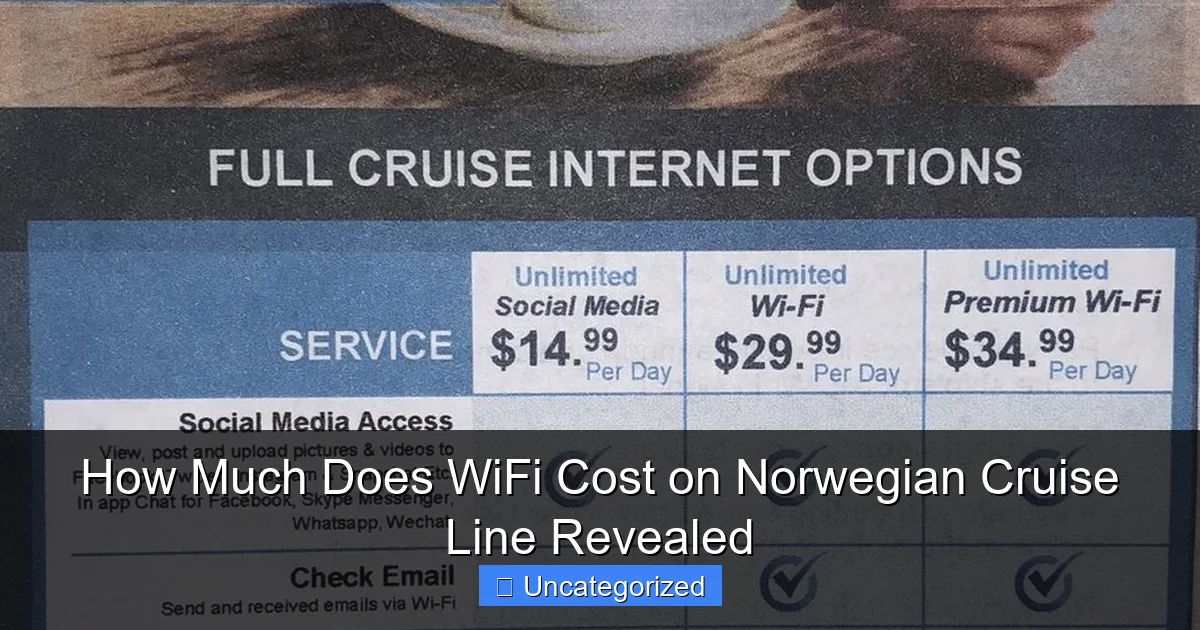
Featured image for how much does wifi cost on norwegian cruise line
Image source: oceanblissjourneys.com
Norwegian Cruise Line offers WiFi packages starting at $24.99 per day, with options to suit casual browsing or heavy streaming—perfect for staying connected at sea. Choose from single-device, multi-device, or unlimited plans, and save by purchasing pre-cruise, with discounts up to 30% off daily rates.
Key Takeaways
- WiFi packages start at $25/day: Choose based on your data and device needs.
- Multi-device plans save money: Share connections across phones, tablets, and laptops.
- Book online for discounts: Pre-purchase before boarding to secure lower rates.
- Free minutes vary by cruise: Check your itinerary for included complimentary access.
- Streaming uses data quickly: Opt for higher-tier plans if watching videos or video calling.
📑 Table of Contents
- How Much Does WiFi Cost on Norwegian Cruise Line: A Complete Breakdown
- Understanding Norwegian Cruise Line’s WiFi Network and Technology
- Norwegian Cruise Line WiFi Packages: Pricing and Features (2024)
- Cost Comparison: WiFi on Norwegian vs. Other Major Cruise Lines
- Tips to Save Money on Norwegian Cruise Line WiFi
- Real-World WiFi Performance: What to Expect Onboard
- Final Thoughts: Is Norwegian Cruise Line WiFi Worth the Cost?
How Much Does WiFi Cost on Norwegian Cruise Line: A Complete Breakdown
Imagine setting sail on the open sea, surrounded by breathtaking ocean views, gourmet dining, and world-class entertainment. You’re on a Norwegian Cruise Line (NCL) vacation—a dream come true for many travelers. But as you snap a photo of the sunset and reach for your phone to post it online, a nagging question arises: *How much does WiFi cost on Norwegian Cruise Line?* In today’s hyper-connected world, staying online isn’t just a luxury—it’s often a necessity, whether you’re checking work emails, sharing memories with loved ones, or navigating your itinerary.
For cruisers, WiFi access can make or break the experience. Unlike traditional land-based vacations, where connectivity is often assumed, cruise ships operate on satellite-based networks, which are more complex and costly to maintain. Norwegian Cruise Line, one of the most popular cruise brands globally, offers a range of WiFi packages designed to meet the needs of different travelers—from social media enthusiasts to remote workers. But with multiple options, fluctuating prices, and varying performance, understanding the true cost and value of WiFi on NCL can feel overwhelming. This comprehensive guide dives deep into the pricing, features, and hidden details of Norwegian Cruise Line’s WiFi offerings, so you can make an informed decision and stay connected without overspending.
Understanding Norwegian Cruise Line’s WiFi Network and Technology
Before diving into pricing, it’s essential to understand how WiFi works on Norwegian Cruise Line ships and why it’s priced differently than your home internet. Unlike terrestrial broadband, cruise ships rely on satellite-based communication systems to provide internet access. These systems use high-orbit or geostationary satellites, which can introduce latency (delay) and bandwidth limitations, especially in remote ocean areas.
Visual guide about how much does wifi cost on norwegian cruise line
Image source: aboutluxurycruising.com
Satellite Connectivity and Bandwidth Constraints
NCL has partnered with Marlink and Intellian to deliver high-speed internet across its fleet. The company uses a mix of VSAT (Very Small Aperture Terminal) and Ka-band satellite technologies to offer faster speeds than older systems. However, bandwidth is shared among all passengers and crew, which means performance can vary based on:
- Ship occupancy (more guests = slower speeds)
- Time of day (peak hours like evenings see higher demand)
- Geographic location (near ports or coastal areas often have better signal)
- Weather conditions (storms can disrupt satellite signals)
For example, on a fully booked 4,000-passenger ship like the Norwegian Encore, a single satellite connection might serve thousands of devices simultaneously. This shared model explains why NCL limits data usage per device and offers tiered plans based on speed and duration.
WiFi Zones and Coverage
WiFi is available in most public areas, including staterooms, dining rooms, lounges, pools, and outdoor decks. However, coverage can be spotty in certain locations, such as:
- Inside elevators
- Lower deck corridors
- Remote areas of the ship’s outer decks
To maximize connectivity, NCL recommends using WiFi in open areas or near large windows. The company also provides a “WiFi Map” in the NCL app and onboard screens showing the best signal zones. Additionally, some newer ships, like the Norwegian Prima class, feature upgraded antenna systems and mesh networks for improved coverage.
Device Compatibility and Usage Limits
NCL WiFi supports all standard devices: smartphones, tablets, laptops, and smartwatches. However, each device must be logged in separately, and there are strict usage limits:
- Streaming high-definition video (e.g., Netflix, YouTube) is restricted on lower-tier plans
- Video calls (Zoom, FaceTime) may be throttled or blocked on basic packages
- Large file uploads/downloads (e.g., cloud backups) are discouraged
For example, a 30-minute HD video call can consume up to 1 GB of data, which could quickly deplete a basic plan. Understanding these limitations is key to choosing the right package for your needs.
Norwegian Cruise Line WiFi Packages: Pricing and Features (2024)
As of 2024, Norwegian Cruise Line offers three primary WiFi packages: Social, Unlimited, and Premium. Prices vary by itinerary length, ship, and booking method (onboard vs. pre-cruise). Below is a detailed breakdown of each plan.
1. Social WiFi Package
The Social plan is the most affordable option, ideal for travelers who only need light internet use.
- Price: $14.99–$24.99 per person, per day
- Data Allowance: 250 MB per device (not shared across devices)
- Speed: Up to 3 Mbps (suitable for emails, social media, and light browsing)
- Features:
- Access to social media platforms (Instagram, Facebook, Twitter/X)
- Email and messaging apps (WhatsApp, iMessage)
- No streaming or video calls (blocked or heavily throttled)
Example: On a 7-day cruise, the Social plan costs $105–$175 per person. If you only plan to check email and post a few photos, this is a cost-effective choice. However, if you accidentally stream a 10-minute video (≈100 MB), you’ll use nearly half your daily data.
2. Unlimited WiFi Package
The Unlimited plan is NCL’s most popular option, offering full access to most online activities.
- Price: $24.99–$39.99 per person, per day
- Data Allowance: Unlimited (but subject to fair usage policies)
- Speed: Up to 5 Mbps (supports video streaming at 480p/720p)
- Features:
- All websites and apps accessible
- Streaming allowed (Netflix, YouTube, Spotify) at reduced quality
- Video calls supported (Zoom, FaceTime) but may lag
- No large file downloads (e.g., software updates)
Example: For a family of four on a 10-day cruise, the Unlimited plan costs $999.60–$1,599.60. While “unlimited,” NCL may throttle speeds if you use excessive data (e.g., 50+ GB). This plan is ideal for casual browsing, streaming, and occasional video calls.
3. Premium WiFi Package
The Premium plan is designed for remote workers, business travelers, and heavy internet users.
- Price: $39.99–$59.99 per person, per day
- Data Allowance: Unlimited with higher priority access
- Speed: Up to 10 Mbps (supports HD streaming and low-latency video calls)
- Features:
- Priority bandwidth (less throttling during peak hours)
- HD video streaming (Netflix, Hulu, Disney+)
- Stable video conferencing (Zoom, Teams, Webex)
- Faster file downloads (up to 500 MB recommended)
Example: On a 5-day cruise, the Premium plan costs $199.95–$299.95 per person. This is the best choice if you need to join virtual meetings, upload large files, or stream in HD. Note: Premium users get a dedicated support line for connectivity issues.
Special Offers and Discounts
NCL frequently runs promotions, especially for:
- Pre-cruise bookings: Save 10–20% by purchasing WiFi online before departure
- Group packages: Discounts for families or groups of 4+ (e.g., “Buy 3, Get 1 Free”)
- Loyalty members: Free or discounted WiFi for Latitudes Rewards members (Gold tier and above)
Tip: Always check NCL’s official website or contact customer service 48 hours before your cruise to lock in the best pre-cruise rate.
Cost Comparison: WiFi on Norwegian vs. Other Major Cruise Lines
To put NCL’s WiFi pricing into perspective, here’s how it compares to other leading cruise brands in 2024.
Price Per Day (Average, 7-Day Cruise)
| Cruise Line | Basic Plan | Mid-Tier Plan | Premium Plan |
|---|---|---|---|
| Norwegian Cruise Line | $14.99–$24.99 | $24.99–$39.99 | $39.99–$59.99 |
| Carnival Cruise Line | $15.99 (Social) | $25.99 (Premier) | $35.99 (Premier Plus) |
| Royal Caribbean | $19.99 (Basic) | $29.99 (Deluxe) | $39.99 (Premium) |
| Princess Cruises | $16.95 (Social) | $26.95 (Unlimited) | $36.95 (Premium) |
| Disney Cruise Line | $24.99 (Standard) | $34.99 (Premium) | $44.99 (Premium Plus) |
Key Takeaways
- NCL is competitively priced—its Social and Unlimited plans are on par with Carnival and Princess, while Premium is slightly higher than Royal Caribbean.
- Disney Cruise Line is the most expensive, with fewer data restrictions but higher daily rates.
- Royal Caribbean offers the best value for Premium, with speeds up to 15 Mbps (vs. NCL’s 10 Mbps).
- All lines use similar satellite tech, so performance differences are minimal.
Hidden Fees and Add-Ons
Watch out for these extra costs:
- Onboard purchases: Buying WiFi on the first day can cost 10–20% more than pre-cruise booking.
- Device limits: Each plan covers one device. Adding a second device costs $5–$10 per day.
- Port-day surcharges: Some itineraries (e.g., Alaska) have higher fees due to longer satellite latency.
Tips to Save Money on Norwegian Cruise Line WiFi
WiFi can quickly become one of the largest onboard expenses. Use these strategies to reduce costs without sacrificing connectivity.
1. Book WiFi Before Your Cruise
NCL’s pre-cruise online portal offers discounts of 10–20%. For example, a 7-day Unlimited plan ($24.99/day) drops to $19.99/day if booked online. To access:
- Log in to your NCL account
- Navigate to “Pre-Cruise” > “Internet”
- Select your package and complete payment
Pro Tip: Book at least 48 hours before departure to avoid last-minute price hikes.
2. Leverage Loyalty Program Benefits
NCL’s Latitudes Rewards program offers free WiFi upgrades for higher tiers:
- Silver: 10% discount on WiFi
- Gold: 25% discount or 1 free Social plan
- Platinum/Elite: Free Unlimited or Premium plan
To join, create a free account and link your cruise bookings. After 3–5 cruises, you can reach Gold status and save hundreds on WiFi.
3. Share a Plan (With Caution)
NCL allows plan sharing across devices, but only one device can be active at a time. This works if:
- You’re traveling with a partner who doesn’t need constant internet
- You’re a solo cruiser using a phone and laptop
Example: A couple sharing an Unlimited plan on a 7-day cruise saves $350 vs. two individual plans. Note: NCL’s system automatically logs out inactive devices after 30 minutes.
4. Use Public WiFi in Port
When docked, connect to free port WiFi (e.g., cruise terminals, cafes) to offload data usage. For example:
- Download maps, itineraries, or e-books before shore excursions
- Upload photos to cloud storage (Google Photos, iCloud)
- Send large files (e.g., work documents)
Tip: Use a VPN for security on public networks.
5. Monitor Data Usage
NCL’s WiFi dashboard (accessible via the NCL app or onboard kiosks) shows real-time data usage. Set daily limits to avoid surprises. For Social plan users, enable data-saving modes on apps like Facebook and Instagram.
Real-World WiFi Performance: What to Expect Onboard
Price and features are important, but how does NCL WiFi actually perform in practice? Based on passenger reviews, ship-specific data, and technical reports, here’s what to expect.
Speed and Reliability
- Peak hours (7–11 PM): Speeds drop by 30–50% due to high demand. A Premium plan may deliver 4–6 Mbps instead of 10 Mbps.
- Off-peak hours (1–6 AM): Speeds are 20–30% faster. Ideal for downloading large files.
- Coastal areas: Near land, speeds can reach 12–15 Mbps (even on Unlimited plans).
- Remote oceans: Latency increases to 600–800 ms, causing delays in video calls.
Example: A Zoom call on an Unlimited plan may freeze every 30 seconds in open water but run smoothly near ports.
Ship-by-Ship Differences
Newer ships (e.g., Norwegian Prima, Norwegian Viva) use advanced satellite systems and offer better performance:
- Prima-class ships: 20% faster speeds, wider coverage
- Breakaway-class ships: Reliable but older tech (e.g., Norwegian Escape)
- Sun-class ships: Spotty coverage in staterooms
Common Complaints and Fixes
- “WiFi disconnects constantly”: Try rebooting your device or switching to a different zone (e.g., from pool deck to atrium).
- “Streaming buffers too much”: Lower video quality in Netflix/YouTube settings (switch to 480p).
- “Login page won’t load”: Clear browser cache or use the NCL app’s direct login.
Pro Tip: Visit the Guest Services desk for a “WiFi refresh” if issues persist. Crew can reset your connection or provide a temporary boost.
Final Thoughts: Is Norwegian Cruise Line WiFi Worth the Cost?
So, how much does WiFi cost on Norwegian Cruise Line? The answer depends on your needs, budget, and travel style. For light users, the Social plan ($15–$25/day) is a budget-friendly way to stay in touch. The Unlimited plan ($25–$40/day) strikes the best balance for most travelers, offering full access without breaking the bank. And for remote workers or heavy streamers, the Premium plan ($40–$60/day) delivers reliable, high-speed connectivity—though it’s the most expensive option.
Ultimately, NCL’s WiFi is competitively priced and technologically advanced, but it’s not perfect. Satellite limitations mean you won’t get land-like speeds, and peak-hour congestion can be frustrating. However, by booking early, leveraging loyalty rewards, and using smart data-saving strategies, you can enjoy seamless connectivity without overspending. Whether you’re sharing sunset photos, joining a virtual meeting, or simply checking the weather, NCL’s WiFi ensures you stay connected—so you can focus on what matters most: enjoying your cruise.
Frequently Asked Questions
How much does WiFi cost on Norwegian Cruise Line?
WiFi packages on Norwegian Cruise Line start at around $24.99 per day for a basic plan (limited to one device), while premium options like the “Unlimited Premium” plan cost $34.99 per day and support multiple devices with faster speeds. Pricing varies based on itinerary length and promotions.
Is there a free WiFi option on Norwegian Cruise Line?
Norwegian Cruise Line does not offer completely free WiFi, but select sailings or loyalty program members (e.g., Latitudes Platinum+) may receive complimentary access or discounts. Always check your booking details for inclusions.
Can I buy WiFi for just one day on Norwegian Cruise Line?
Yes, Norwegian Cruise Line allows you to purchase WiFi packages daily, starting at $24.99. However, multi-day or unlimited plans often provide better value for longer cruises.
Does Norwegian Cruise Line offer unlimited WiFi packages?
Yes, the “Unlimited Premium” plan ($34.99/day) provides high-speed WiFi for multiple devices, ideal for streaming, video calls, and social media. Shorter itineraries may have flat-rate pricing.
How does Norwegian Cruise Line WiFi pricing compare to other cruise lines?
Norwegian’s WiFi costs are competitive, with basic plans starting lower than some rivals (e.g., Royal Caribbean, Carnival). Premium speeds and multi-device options align with industry standards, but deals vary by season.
Are there discounts for Norwegian Cruise Line WiFi packages?
Discounts are occasionally available for Latitudes members, early bookings, or group reservations. Pre-cruise purchases often include reduced rates compared to onboard pricing—check the Cruise Planner app for deals.